
Professional WiFi Design vs Mesh: Why Your Gold Coast Home Still Has Black Spots
That "plug-and-play" mesh kit you bought from the local electronics store was never designed to handle the structural reality of a double-brick Gold Coast home. It is incredibly frustrating to pay for a top-tier NBN or Starlink plan only to have your connection crawl to a halt because of a concrete slab or a poorly placed node. Most homeowners believe a mesh system is the ultimate fix for dead zones, but often, these kits are just expensive band-aids for deeper infrastructure gaps.
In this guide, we break down the reality of professional wifi design vs mesh to show you why custom-engineered solutions succeed where off-the-shelf hardware fails. You will discover how a structured cabling backbone and strategic access point placement deliver true gigabit performance and seamless roaming without a single visible wire. We will look at the technical limitations of wireless backhaul and the meticulous process of heatmapping that ensures every corner of your property remains connected at full speed. By understanding the mechanical requirements of a robust network, you can finally stop troubleshooting your router and start enjoying the bandwidth you are already paying for.
Key Takeaways
- Understand the core technical differences in professional wifi design vs mesh. Learn how hardwired backbones eliminate the speed loss common in wireless node systems.
- Identify why "sticky client" issues and wireless interference cause intermittent dropouts, even when your device shows full signal bars.
- Learn how master technicians use heatmapping software to visualise signal penetration through concrete and double-brick. This ensures total coverage without trial and error.
- Discover why structured cabling is the only way to future-proof your home for WiFi 7 and the next generation of high-speed digital infrastructure.
- Recognise the 200sqm property threshold where off-the-shelf kits typically degrade. Professional-grade access points become a necessity for performance at this scale.
The Great WiFi Debate: Consumer Mesh Kits vs Custom Designed Networks
Walk into any local electronics retailer and you will see shelves lined with "whole-home" mesh kits promising an end to your connectivity woes. These systems rely on a Wireless mesh network topology, where multiple nodes talk to each other over the air to spread a signal. While the "plug-and-play" marketing is seductive, it often ignores the fundamental laws of physics. For a small, open-plan apartment, mesh might suffice. However, when comparing professional wifi design vs mesh for a multi-storey Gold Coast residence, the difference is the gap between a consumer appliance and a robust utility.
Professional WiFi design moves away from the "hope and pray" method of placing nodes near power points. Instead, it uses a blueprint-led approach where high-performance Access Points (APs) are strategically positioned based on signal heatmapping. These APs are managed by a central controller that handles handoffs between rooms perfectly. The core distinction lies in the backhaul. While mesh nodes compete for airtime to talk to each other, a professional system uses dedicated physical cabling to ensure every AP has a direct, full-speed connection to the core network.
Why Australian Homes are WiFi's Worst Enemy
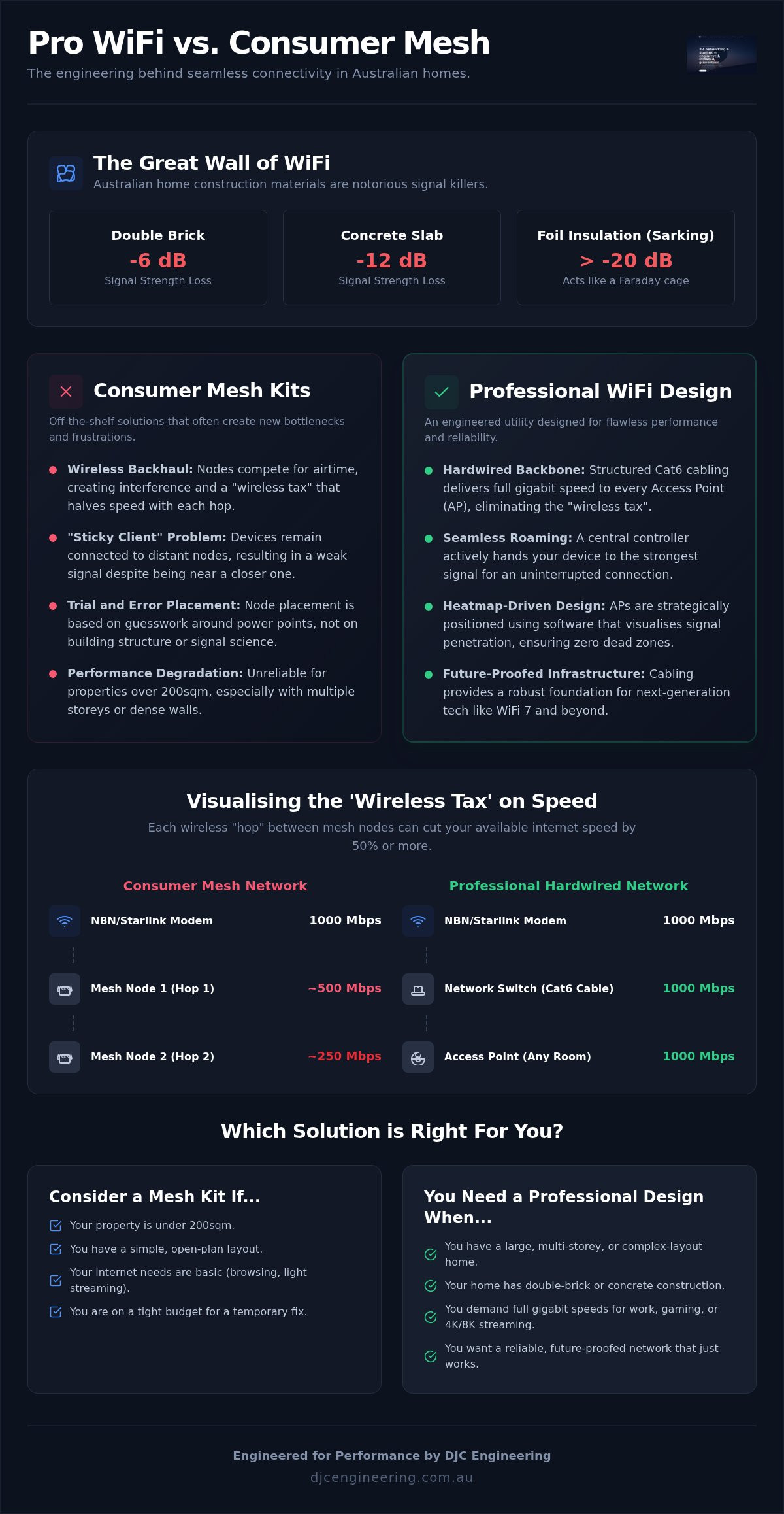
Gold Coast architecture presents unique challenges that off-the-shelf kits simply aren't equipped to handle. Many local homes feature double-brick internal walls or thick concrete slabs between floors. These materials are signal killers, especially for the high-frequency 5GHz and 6GHz bands used by WiFi 6 and WiFi 7. A signal that starts at 1,000Mbps at the router can drop to a fraction of that after passing through just one brick wall.
Modern Queensland builds often use foil-backed insulation, known as Sarking, to manage the heat. While great for your power bill, this foil acts as a Faraday cage, reflecting radio waves and trapping them within specific zones. A professional assessment is the only way to identify these attenuation points before you waste money on hardware that cannot penetrate the structure of your home.
The 'Wireless Tax': Understanding Throughput Loss
Every time a mesh node repeats a signal wirelessly, you pay a "wireless tax." In a standard dual-band mesh system, the node must use the same radio to talk to your phone and the main router. This half-duplex communication can cut your effective speed by 50% for every "hop" the signal takes. Tri-band systems attempt to mitigate this by adding a dedicated wireless lane for backhaul, but they are still prone to interference from neighbours and household appliances.
A custom WiFi Design & Installation bypasses this tax entirely. By using structured Cat6 cabling as the backbone, the "hop" happens over copper at lightning speeds, leaving the entire wireless spectrum available for your devices. This ensures that if you pay for a gigabit NBN or Starlink plan, you actually see those speeds in the bedroom, not just standing next to the modem.
The Technical Truth: Why Wireless Mesh Often Drops the Ball
High latency. Jittery Zoom calls. Frozen Netflix screens. These are the mechanical symptoms of a network struggling to manage data packets over a congested wireless medium. While many homeowners decide to replace a traditional Wi-Fi router with mesh, they often trade one bottleneck for another. The fundamental issue with consumer mesh is that it relies on the same unstable airwaves to transmit data between nodes as it does to talk to your devices. This creates a feedback loop of interference, especially in dense Gold Coast suburbs where your neighbours' networks are competing for the same limited spectrum.
The "Sticky Client" problem is another major failure of off-the-shelf kits. Most mesh nodes lack the intelligence to force a handoff. Your phone stays "stuck" to a distant node in the lounge room even as you sit next to a node in the office, resulting in a weak, crawling connection. In a professional wifi design vs mesh comparison, the professional system uses active roaming protocols to hand your device off to the strongest signal instantly. This ensures a seamless transition as you move through your home. To achieve this level of reliability, we utilise Power over Ethernet (PoE), which powers the hardware through the data cable itself. This eliminates messy power bricks and ensures your network hardware is high-performance and discreetly mounted.
Backhaul Explained: Wireless vs Wired
The secret to a rock-solid network is the backhaul. Wireless mesh uses "hops" to move data, but every hop is vulnerable to environmental interference from microwaves, mirrors, and even internal plumbing. Professional systems rely on structured cabling to provide a dedicated data highway for every Access Point. Using Cat6 copper as the backbone means your data travels at the speed of light without being degraded by walls or weather. If you want to stop guessing why your speeds fluctuate, you can request a technical assessment of your home infrastructure to see where a wired backbone is needed.
Scalability and Management
Performance typically falls off a cliff once you add more than three nodes to a wireless mesh system. The overhead required to manage the wireless chatter between nodes consumes the very bandwidth you are trying to use. Professional designs use centralised management to monitor network health and optimise channel widths in real-time. A Network Controller is the dedicated brain that manages seamless roaming between APs by actively directing client devices to the strongest available signal. This level of oversight allows us to verify that every square metre of your property is receiving the full throughput of your internet plan.
Heatmapping and Engineering: How Professionals Eliminate Dead Zones
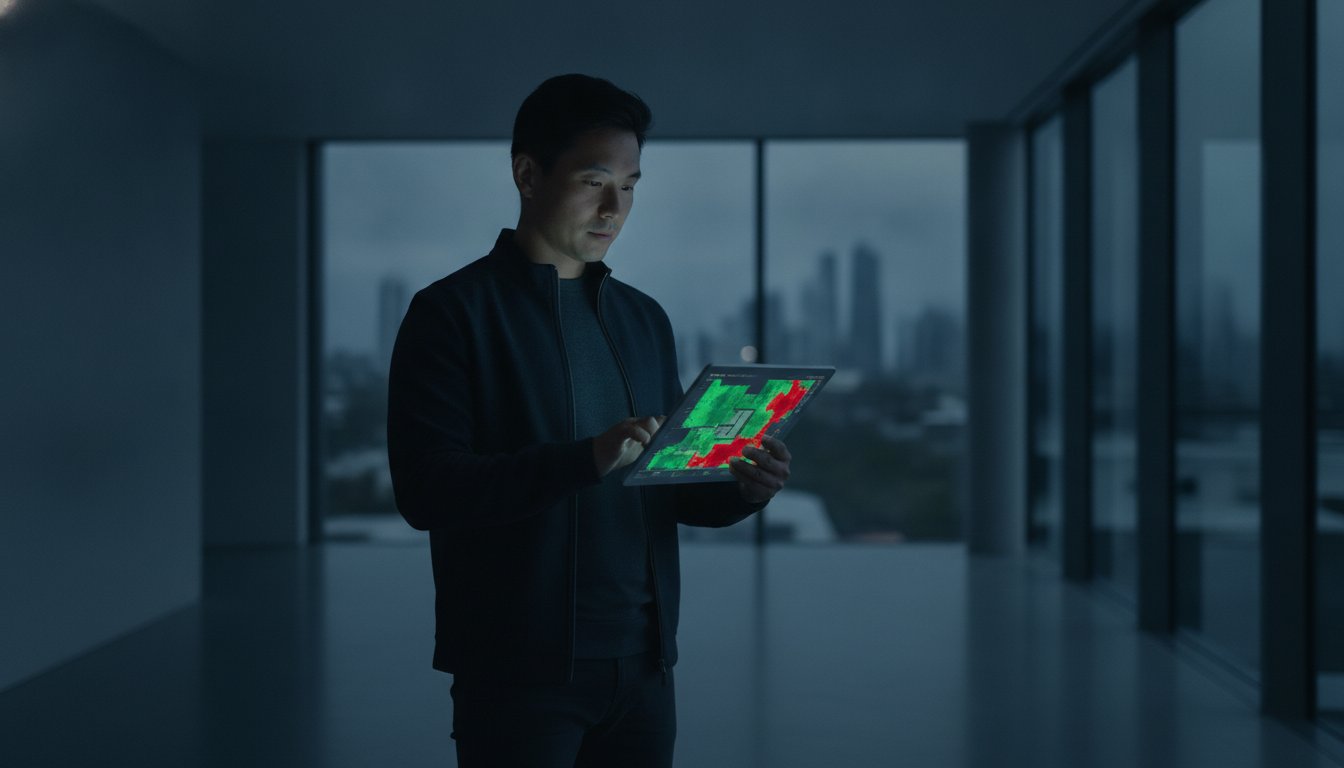
Measuring WiFi success by the "bars" on your smartphone is a fundamentally flawed approach. Those bars are a vague representation of signal strength, but they tell you nothing about the quality of the connection or the level of background interference. When comparing professional wifi design vs mesh, the engineering phase is what separates a high-performance network from a frustrating one. We use specialised software to conduct a comprehensive site survey, creating a visual heatmap of your property’s Radio Frequency (RF) environment. This allows us to see exactly how signals propagate through your specific floor plan.
A master technician focuses on the signal-to-noise ratio (SNR). It is not enough to have a "loud" signal if the background "noise" from neighbouring networks or household electronics is too high. If the noise floor is elevated, your devices will struggle to distinguish data packets, leading to the lag and dropouts common in DIY mesh setups. We also account for the human element. Radio waves at 5GHz and 6GHz are absorbed by water, meaning the presence of people in a room or even large pieces of furniture can significantly alter signal behaviour. Engineering a solution means calculating these variables before a single piece of hardware is mounted.
The Visual Proof of Performance
Predictive modelling allows us to simulate the network's performance before the installation begins. We can identify potential black spots caused by structural steel beams, large home theatre setups, or mirrored wardrobes that reflect RF signals. This scientific approach ensures 100% coverage across the entire footprint of your home. For those with larger properties or home offices, you can find insights from commercial wifi design brisbane for a deeper look at how these principles scale to handle higher device densities and more complex layouts.
Aesthetic Integration
Placement is everything. While consumer mesh nodes are often relegated to bookshelves or hidden inside cupboards, professional Access Points are typically ceiling-mounted. This provides a clear "line of sight" to your devices, reducing the number of obstacles the signal must penetrate. A professional finish means all Cat6 cabling is concealed within the wall cavities or ceiling space, leaving only a sleek, low-profile AP visible. This neatness is not just about pride of workmanship. A clean, high-performance digital infrastructure adds genuine value to Gold Coast properties, appealing to the growing market of remote professionals who view reliable connectivity as a non-negotiable utility.
Selection Criteria: Mesh or Expert Help?
Choosing between a retail kit and a custom-engineered solution comes down to your home's physical footprint and your reliance on the connection. For many local residents, the debate of professional wifi design vs mesh is settled by the 200sqm threshold. Once a property exceeds this size, or introduces multiple levels, the wireless backhaul of a standard mesh system begins to degrade significantly. You aren't just paying for hardware; you are investing in the engineering required to maintain throughput across a large area without the signal dropping out as you move between rooms.
The source of your internet also dictates the robustness of your internal network. A Starlink installation often provides high burst speeds that a basic mesh kit simply cannot distribute effectively through brick or concrete. If you are a "Power User"—someone working from home, gaming, or managing a complex smart home—the intermittent jitter of a wireless node becomes a daily productivity drain. While a mesh kit is a cheaper initial purchase, it lacks the 10-year utility and stability of a structured cabling backbone. We view connectivity as a permanent utility, much like your plumbing or electricity.
The DIY Mesh Use Case
Consumer mesh kits have a legitimate place in the market. If you live in a small, open-plan apartment or a single-storey timber-framed home, a two-node system might provide adequate coverage for basic browsing and social media. This is often the best path for renters who cannot justify the cost of permanent infrastructure or lack the permission to install cabling. It is a functional choice for non-critical usage where a brief dropout during a video call is a minor annoyance rather than a professional setback.
The Professional Design Use Case
Custom engineering is the standard for multi-storey concrete builds or expansive acreage properties where signal attenuation is guaranteed. This approach is essential for homes requiring security camera installation Gold Coast wide, as high-definition surveillance feeds require a constant, high-bandwidth uplink that mesh cannot reliably provide. If your business operates from home or you require 100% uptime for critical systems, a designed network is the only way to guarantee performance. Professional integration ensures your hardware is calibrated to your specific environment, not just a generic factory setting. If you are ready to eliminate black spots for good, you can book a site survey with our licensed technicians to design a system that actually works.
Future-Proofing Your Connectivity with DJC Engineering
Technology moves at a relentless pace. While a standard consumer router or mesh node is typically obsolete within three years, the physical infrastructure behind a professional installation is built to last decades. When evaluating professional wifi design vs mesh, you must consider the longevity of the backbone. A high-quality Cat6 or Fibre optic cable run is a permanent asset that remains relevant long after you have upgraded your handheld devices. We focus on installing 10Gbps-ready infrastructure today, ensuring your home is prepared for the massive data demands of tomorrow.
As of August 2026, WiFi 7 has become the established standard for high-performance networking. It offers significant gains in speed and reduced latency, but these benefits are entirely dependent on the quality of the cabling behind the Access Point. A wireless mesh node trying to repeat a WiFi 7 signal will still face the same physical bottlenecks of signal attenuation and interference. By engineering a system with a wired backhaul, we verify that you are actually receiving the performance you paid for. The DJC Engineering approach is defined by meticulous standards, where every component is concealed and every connection is tested for maximum throughput.
Integration with Smart Home Systems
A modern Gold Coast home is often filled with smart locks, speakers, and climate control systems that require a rock-solid foundation to function. These devices often compete for bandwidth and can introduce security vulnerabilities if not managed correctly. Much like the commercial wifi systems we design for local businesses, residential projects benefit from advanced network segmentation. We use Virtual LANs (VLANs) to create isolated pathways for different types of traffic. We segregate 'Guest' and 'IoT' traffic from your primary data to ensure your private files remain secure while your smart devices stay connected.
Take Action: Reclaim Your Bandwidth
Stop wasting money on retail "boosters" and extenders that only amplify an already degraded signal. These are temporary fixes that rarely solve the underlying issue of poor RF propagation or structural interference. The first step toward a seamless digital experience is a technical site survey. Our licensed technicians will assess your property's specific challenges and provide a blueprint for a network that delivers true gigabit performance. It is time to treat your connectivity with the same precision as any other essential home utility. Organise your professional WiFi design consultation with DJC Engineering today and experience the difference that custom engineering makes.
Eliminate Your WiFi Dead Zones Permanently
Relying on off-the-shelf hardware is a gamble that rarely pays off in the complex architectural landscape of South East Queensland. We have shown that the core of the professional wifi design vs mesh debate is the difference between an unstable wireless repeating system and a robust, hardwired infrastructure. By prioritising a structured cabling backbone, you ensure that your high-speed Starlink or NBN connection is actually usable in every corner of your property. Engineering a network through precise heatmapping removes the guesswork and delivers a clean, professional finish that enhances your home's utility.
Our team of Licensed ACMA Technicians understands the unique structural challenges of Gold Coast builds, from double-brick walls to foil insulation. We provide a meticulous "no-cables-visible" guarantee, ensuring your high-performance network is as discreet as it is powerful. It's time to stop troubleshooting your router and start enjoying seamless roaming across your entire home. Book a Professional WiFi Site Assessment on the Gold Coast with DJC Engineering today. Let's build a network that finally matches the speed of your lifestyle.
Frequently Asked Questions
Is a professional WiFi installation worth it for a standard home?
Yes, if you value a stable connection and want to utilise the full speed of your NBN or Starlink plan without dropouts. While a basic router works for small units, professional design is essential for homes with multiple levels or difficult building materials. It is an investment in your property's permanent infrastructure rather than a temporary fix that will need replacing in two years.
Can I use my existing mesh nodes with a professionally designed system?
Generally, consumer mesh nodes are not compatible with a custom-engineered network. Most retail hardware lacks the Power over Ethernet (PoE) capabilities and advanced controller management required for a high-performance system. We typically replace these with commercial-grade access points that allow for centralised monitoring and true seamless roaming between rooms.
How long does it take to hardwire a house for WiFi access points?
A standard residential installation on the Gold Coast usually takes between one and two days. This timeframe depends on the complexity of your floor plan and the accessibility of your roof space or wall cavities. Our licensed technicians handle everything from the initial cable runs to the final signal calibration and verification of your network speeds.
Will professional WiFi design work with Starlink or NBN?
Professional WiFi design is the best way to distribute the high speeds provided by Starlink and NBN plans. Many homeowners find that the standard modem provided by their ISP cannot penetrate the walls of their home. We integrate your internet source into a structured cabling backbone that delivers full bandwidth to every corner of your property.
What is the difference between a WiFi extender and a mesh system?
An extender creates a secondary network that often requires manual switching, whereas a mesh system uses a single network name. However, both rely on unstable wireless airwaves to move data. In the debate of professional wifi design vs mesh, the professional solution is superior because it uses physical Cat6 cabling to ensure every access point receives a dedicated, full-speed data feed.
Why does my WiFi speed drop so much in the bedroom compared to the lounge?
This drop is caused by signal attenuation, where physical objects like brick walls, mirrors, and furniture absorb the radio waves. High-frequency 5GHz and 6GHz bands are particularly sensitive to these obstacles. A professional assessment identifies these barriers and uses heatmapping to determine the exact placement needed to maintain a clear line of sight for your devices.
Can you install WiFi access points in an existing double-brick home without visible wires?
Yes, we specialise in concealing all components and cabling within the existing structure of double-brick homes. Our master technicians use specialised cable-fishing techniques to navigate wall cavities and ceiling spaces. We take pride in delivering a clean, professional finish with a "no-visible-wires" guarantee, ensuring your home's aesthetic remains intact while your connectivity improves.
Do I need to upgrade my cables to Cat6 for WiFi 6 or WiFi 7?
Upgrading to Cat6 is essential if you want to support the 1Gbps to 10Gbps throughput offered by WiFi 6 and WiFi 7 hardware. Older Cat5 or Cat5e cabling will act as a bottleneck, preventing your new access points from reaching their maximum potential. Installing Cat6 ensures your home's digital backbone is future-proofed for at least the next decade of technological advancements.
Frequently Asked Questions
Yes, if you value a stable connection and want to utilise the full speed of your NBN or Starlink plan without dropouts. While a basic router works for small units, professional design is essential for homes with multiple levels or difficult building materials. It is an investment in your property's permanent infrastructure rather than a temporary fix that will need replacing in two years.
Generally, consumer mesh nodes are not compatible with a custom-engineered network. Most retail hardware lacks the Power over Ethernet (PoE) capabilities and advanced controller management required for a high-performance system. We typically replace these with commercial-grade access points that allow for centralised monitoring and true seamless roaming between rooms.
A standard residential installation on the Gold Coast usually takes between one and two days. This timeframe depends on the complexity of your floor plan and the accessibility of your roof space or wall cavities. Our licensed technicians handle everything from the initial cable runs to the final signal calibration and verification of your network speeds.
Professional WiFi design is the best way to distribute the high speeds provided by Starlink and NBN plans. Many homeowners find that the standard modem provided by their ISP cannot penetrate the walls of their home. We integrate your internet source into a structured cabling backbone that delivers full bandwidth to every corner of your property.
An extender creates a secondary network that often requires manual switching, whereas a mesh system uses a single network name. However, both rely on unstable wireless airwaves to move data. In the debate of professional wifi design vs mesh, the professional solution is superior because it uses physical Cat6 cabling to ensure every access point receives a dedicated, full-speed data feed.
This drop is caused by signal attenuation, where physical objects like brick walls, mirrors, and furniture absorb the radio waves. High-frequency 5GHz and 6GHz bands are particularly sensitive to these obstacles. A professional assessment identifies these barriers and uses heatmapping to determine the exact placement needed to maintain a clear line of sight for your devices.
Yes, we specialise in concealing all components and cabling within the existing structure of double-brick homes. Our master technicians use specialised cable-fishing techniques to navigate wall cavities and ceiling spaces. We take pride in delivering a clean, professional finish with a "no-visible-wires" guarantee, ensuring your home's aesthetic remains intact while your connectivity improves.
Upgrading to Cat6 is essential if you want to support the 1Gbps to 10Gbps throughput offered by WiFi 6 and WiFi 7 hardware. Older Cat5 or Cat5e cabling will act as a bottleneck, preventing your new access points from reaching their maximum potential. Installing Cat6 ensures your home's digital backbone is future-proofed for at least the next decade of technological advancements.